New in FavTray 2.1.0.
A clipboard history
that sorts itself
FavTray Clipboard keeps what you copy on your Mac, encrypted, and sorts it as it arrives: links, code, JSON, paths, amounts, order numbers, images. Secrets are hidden and forgotten in 10 minutes, a keyboard panel pastes anything back, and Safe Paste masks your keys before they reach an AI chat.
Watch it in action
Clipboard: a Mac history that sorts itself. Every copy sorted on your Mac, secrets hidden and forgotten in 10 minutes, and quick paste from the keyboard.
More videos →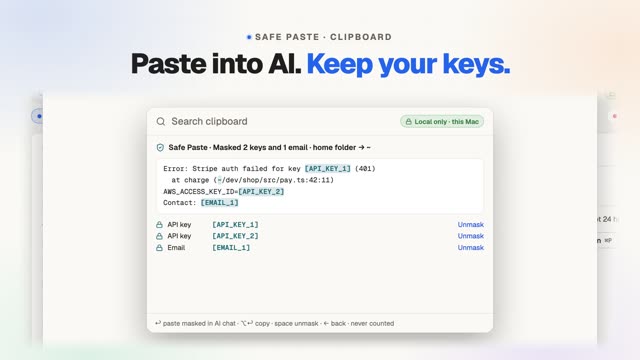
Stored on this Mac, and nowhere else
Clipboard is off until you turn it on. Then every surface shows the same badge: Local only · stored on this Mac. History is encrypted with AES-256-GCM in ~/Library/Application Support/FavTray/Clipboard, and the key sits in your login keychain; Clear rotates it. There's no sync, no account and no upload, and the sorting runs on your Mac with fixed rules, not an AI. FavTray's build fails if the Clipboard code gains a network, sync or AI call. An action you click, such as Open or Track, hands that one item to the site it names, like clicking a link. macOS's own Universal Clipboard is separate and can offer your current copy to your own nearby devices.
How does it sort what I copy?
An on-device classifier knows 48 kinds of copy and puts each one in a group. The chips at the top show only the groups you have, with counts, so a developer sees Code and Dev and an accountant sees Money and IDs. Search covers the text, the kind ("json", "invoice") and the app you copied from. Each kind gets its own actions in the preview.
Links
Web links, localhost links and meeting links. Open, Copy clean link (drops utm_ and click IDs), Copy as Markdown link, Join, or Show in Ports.
Code
Code, shell commands, SQL, diffs and stack traces. Copy as a Markdown code block.
Data
JSON and tables from Excel, Numbers or Sheets. Format or minify JSON; copy a table as Markdown.
Dev
File paths, git SHAs, UUIDs, colours, versions and env lines. Reveal a path in Finder, or copy it as a ~/ path.
Contacts
Emails, phone numbers and addresses. Compose, or open an address in Maps.
Money
Amounts in ₹, $ and other currencies, IBANs and UPI IDs. Copy the amount only, or the amount in words.
IDs
Order, invoice and tracking numbers, GSTIN and PAN, checked where they carry a checksum. Track opens the carrier's page.
Text
Everything else you write, plus dates and times you can turn into a reminder.
Images & files
Screenshots, images and files you copy in Finder, kept encrypted up to 256 MB (oldest unpinned first). Copy text from an image when you ask.
Sensitive
Passwords, codes and tokens FavTray recognises: masked, kept in memory only and forgotten after 10 minutes.
What happens when I copy a password or an API key?
- Never kept: copies from the password-manager apps FavTray knows, copies an app marks private, API keys, private keys, and card numbers written in groups. The footer counts them ("N copies not kept today · Why?") without showing what they were.
- Hidden, then forgotten: passwords, one-time codes, JWTs, tokens and other card numbers show as "••••••••" with a countdown. They stay in memory only and are gone after 10 minutes, when the Mac locks, or when you click Forget now.
- Kept masked: IBANs and an individual's PAN are kept but shown masked; Reveal shows one for 10 seconds.
- Forget recent: the last 5 minutes, 15 minutes, hour or today. Pause for 15 minutes, an hour or until tomorrow, or skip just your next copy.
Recognition catches most secrets, not all. Password-manager browser extensions don't mark their copies, so those rely on it. Anything it misses is still encrypted on disk, and you can delete it.
Paste anything back without leaving the keyboard
Press your shortcut and a panel opens over the app you're in, without taking it out of focus. Type three letters, press ↩, and it pastes where your cursor was. Quick paste has no shortcut until you set one; one click sets ⇧⌘V, and it's also in the menu bar icon's right-click menu.
| Key | What it does |
|---|---|
| ↩ | Paste into the app you were in |
| ⌘1–⌘9 | Paste that row |
| ⌥↩ | Copy only (never counted on Free) |
| ⇧↩ | Paste as plain text |
| ⌃↩ | Safe Paste |
| ⌘P · ⌘⌫ | Pin · delete |
Pins never expire and come first everywhere: the window, the menu bar popover, the panel and the notch island's Clipboard tab. Pasting needs the Accessibility permission; without it, ↩ copies and you press ⌘V.
Paste into AI chats without pasting your secrets
Once you've pasted a key into a chat, the AI has it. These actions run on your Mac with fixed rules, cost no tokens, and keep everything local.
Safe Paste
Before you paste into an AI chat, keys, tokens, passwords, emails, card numbers, IBAN, PAN, Aadhaar and SSN values become placeholders like [API_KEY_1], and /Users/you becomes ~. A preview shows what gets masked, and you can unmask any single value. ⌃↩ in quick paste, ⌃⌘↩ in the window.
Restore
Copy the AI's answer and Restore puts the real values back in place of the placeholders. A placeholder the AI changed is reported, never guessed. The map lives in memory only and is forgotten 10 minutes after the last paste, or when the Mac locks or sleeps, or FavTray quits.
Paste as rich text
Markdown from an AI chat pastes as formatted text into Mail, Slack or Docs, using the same Markdown parser as FavTray Notes. Copy as Markdown goes the other way.
Clean AI text
Strips the invisible zero-width and narrow no-break spaces that AI answers often carry.
Dev transforms
Base64 and URL encode and decode, Unix seconds or milliseconds to ISO, local or UTC time, JSON format and minify, and a JWT's header and payload (decoded on your Mac, never called verified).
Safe Paste refuses a copy whose secrets it can't all find, rather than send a half-masked one. Masked pastes don't count toward Free's 10 a day. For screenshots, the same idea is Screenshot's Find secrets and Copy for AI; for rewriting the text itself, see AI Writer.
What does Free include?
| Free | Pro ($4.99 once) | |
|---|---|---|
| Turn on, automatic groups, secret handling, search, copy back, delete, pause | Included | Included |
| History | 24 hours | Your choice, 1 day to forever (30 days by default) |
| Pins (never expire) | 5 | Unlimited |
| Pastes into apps (quick paste ↩, window ⌘↩) | 10 a day; copying back is never limited | Unlimited |
| Quick paste panel, images, rich text, AI actions | Included | Included |
| Clipboard tab in the notch island | — | Included |
If your trial or licence ends, nothing is deleted: each copy keeps the expiry it had, pins past 5 stay, and past 10 pastes a day the panel copies instead. Compare every tool on the pricing page.
Frequently asked questions
Where does FavTray keep my clipboard history?
Only on your Mac. History is encrypted (AES-256-GCM) in ~/Library/Application Support/FavTray/Clipboard, with the key in your login keychain. There is no sync, no account and no upload, and nothing you copy is sent to a FavTray server or an AI. FavTray's build fails if the Clipboard code gains a network, sync or AI call. macOS's own Universal Clipboard is separate: it can offer what's on your clipboard right now to your own nearby devices.
Does it record my passwords?
It tries hard not to. Copies from password-manager apps FavTray knows, and copies an app marks private, are never kept. API keys and private keys are never kept either. Passwords, one-time codes, JWTs and tokens FavTray recognises are masked, kept in memory only and forgotten after 10 minutes. Password-manager browser extensions don't mark their copies, so those rely on recognition, which catches most secrets, not all: delete anything you regret with Forget now or Forget recent.
What is Safe Paste?
A way to paste into ChatGPT, Claude or any AI chat without handing it your secrets. Safe Paste swaps keys, tokens, emails, card numbers and other personal data for placeholders like [API_KEY_1] and shows you a preview first. When you copy the AI's answer, Restore puts the real values back. It runs on your Mac with fixed rules, not an AI, and the placeholder map is kept in memory only for 10 minutes.
Is FavTray Clipboard free?
Yes. Free keeps 24 hours of history, 5 pins and 10 pastes into other apps a day, and copying an item back is never limited. Pro, a one-time $4.99 Lifetime license, keeps history for as long as you choose, from 1 day to forever (30 days by default), with unlimited pins and pastes. Every install gets Pro free for 7 days.
What happens to my history if Pro ends?
Nothing is deleted. Each copy keeps the expiry it was given, new copies keep 24 hours, pins past 5 stay pinned (adding one more asks for Pro), and past 10 pastes a day the panel copies instead of pasting.
What is the quick paste shortcut?
Quick paste has no shortcut until you set one, so it never takes over a key you already use. One click sets ⇧⌘V. In the panel, type to filter, ↩ pastes into the app you were in, ⌘1 to ⌘9 paste a row, ⌥↩ only copies and ⇧↩ pastes plain text. Pasting needs the Accessibility permission; without it, ↩ copies and you press ⌘V.
Why does macOS ask about pasting from other apps?
Newer macOS versions can ask before an app reads what you copied in another app. FavTray reads the clipboard only when macOS allows it without asking, so a copy never raises an alert in the background. If macOS is asking, a two-step guide gets FavTray listed in System Settings › Privacy & Security › Paste from Other Apps and switched to Allow.
Does it record what I copy on my iPhone?
Yes, copies that arrive through Universal Clipboard are recorded like any other. When FavTray puts a hidden item back on the clipboard, it marks it for this Mac only and as concealed, and clears it after 90 seconds if you haven't copied anything since.
How it compares with Maccy, Paste and Raycast: the best clipboard managers for Mac. What FavTray stores and where: the privacy policy. The island's Clipboard tab: FavShelf.
Copy freely, keep it on your Mac
Free with 24 hours of history. Pro, $4.99 once, keeps it as long as you like. 7-day unlimited trial, no card, no account.